How the habit grid works
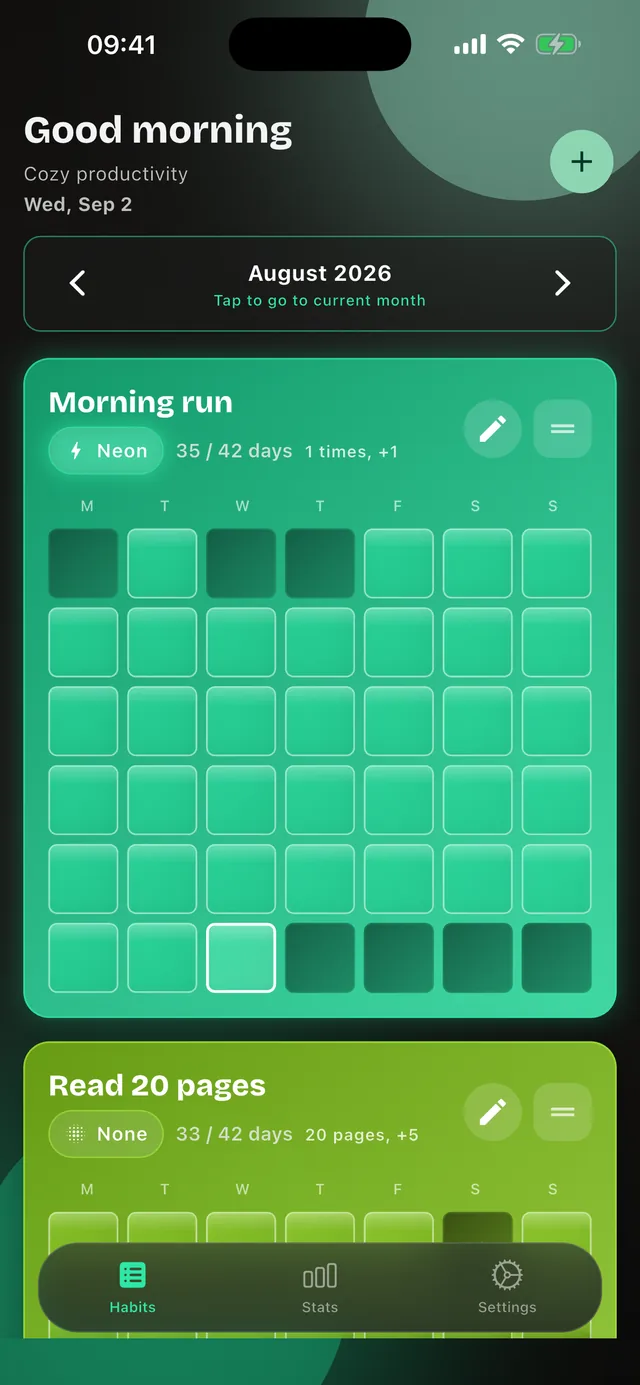
Habit Tracker Grid shows every habit as a grid of small cells, one per day. Each cell is coloured by what you got done that day.
Add a habit
A name and a colour are enough. If you like, add a goal with a unit and a step size, such as 50 push-ups, 2 litres or 20 pages. 2 habits are free, with no time limit.
Tick off the day
A tap on today fills its cell. For countable habits your progress counts up in your step size until the day’s goal is reached. If you like, the app reminds you per habit at a time you choose.
Watch the streak
The grid fills up day by day. Completed days sit side by side and form a streak, gaps stay empty and stand out. A whole month fits on one screen. After two or three weeks the grid shows your routine and your consistency at a glance.
What it looks like over several weeks
Where your data lives
Your habits live on your device and in your own iCloud. We never see them. You can also export a full JSON backup and import it again whenever you like, for instance when moving to a new iPhone. Without Premium the first 2 habits are active afterwards, and the others stay saved and come back with Premium. The details are in the privacy policy.
What Premium changes
Nothing about how you use it. Premium lifts the limit of two habits and unlocks five more themes plus a custom hue, your own background image and advanced statistics. $3.99 a month or $12.99 a year, and the yearly plan starts with 7 days free. See the pricing